
大家應該很多時都會用到 QR CODE 有些網頁要付費才能用,有些免費但有些廣告彈出,今次我就介紹如何用開源軟件製作自 QR 產生器。
我們使用 chillerlan/php-qrcode 庫, Apache, php 軟件
Apache 用 2.4
PHP 用 8.4+ 以上 , 這是 chillerlan/php-qrcode 的要求 , 我們看看 php 要安裝什麼 modules 才能符合要求
- PHP 8.4+
ext-mbstring- optional:
ext-gdforQRGdImagebased outputext-imagickwith ImageMagick installedext-fileinforequired byQRImagickoutputsetasign/fpdffor the PDF output moduleintervention/imagefor alternative GD/ImageMagick output
For the QR Code reader, either ext-gd or ext-imagick is required!
chillerlan/php-qrcode 用 composer 安裝
開工
先安裝好 linux 系統我用 ubutu 作演示 , 如果你沒有獨立的 linux server , 可以在 windows 裝 vritualbox , 作測試之用 又或者買 raspberry pi, orange pi 等等做一做 mini server .
# 先安裝 apache web server
apt install apache2

# 再安裝 composer
apt install composer
php 要求8.4+ , ubuntu 官方 php package 是 8.3 , 所以用另一方法安裝其他版本的 php
# 先 update package source
sudo apt update

# 再 Add PHP Repository
sudo apt install software-properties-common gnupg2  apt-transport-https lsb-release ca-certificates

sudo add-apt-repository ppa:ondrej/php

# 安裝 php8.4
sudo apt install php8.4 php8.4-cli php8.4-gd php8.4-imagick php8.4-zip php8.4-xml php8.4-common php8.4-mbstring

# apache2 啟用 php8.4
a2enmod php8.4
安裝 chillerlan/php-qrcode
# 在你的 home 建立新 folder 把 php-qrcode 下載到該 folder

cd ~
mkdir temp
cd temp
composer require chillerlan/php-qrcode
這時 temp folder 內應該有 “vendor” folder 把這個 folder copy 到 “/var/www/html” 裏面 , 再把 index.php 製作出來, 就用 AI 生成吧 !
我用 deepseek 生成 index.php , 這個 file 包含 logo 拼合
<?php
require_once 'vendor/autoload.php';

use chillerlan\QRCode\QRCode;
use chillerlan\QRCode\QROptions;
use chillerlan\QRCode\Common\EccLevel;
use chillerlan\QRCode\Output\QRGdImagePNG;

$qrCodeBase64 = '';
$error = '';
$outputPath = '';

if ($_SERVER['REQUEST_METHOD'] === 'POST' && isset($_POST['text'])) {
    $text = trim($_POST['text']);

    if (empty($text)) {
        $error = '请输入要编码的文本或 URL。';
    } else {
        try {
            // 配置二维码选项 - 使用 QRGdImagePNG 输出类
            $options = new QROptions([
                'outputInterface'  => QRGdImagePNG::class,  // PNG 输出
                'eccLevel'         => EccLevel::H,          // 高纠错级别(加 Logo 必需)
                'version'          => 7,
                'scale'            => 10,
                'outputBase64'     => false,
                'imageTransparent' => true,
            ]);

            // 生成二维码
            $qrcode = new QRCode($options);
            $qrPngData = $qrcode->render($text);

            // 从二进制数据创建 GD 图像资源
            $qrImage = imagecreatefromstring($qrPngData);

            if (!$qrImage) {
                throw new Exception('无法创建二维码图像');
            }

            // 处理 Logo 上传
            if (isset($_FILES['logo']) && $_FILES['logo']['error'] === UPLOAD_ERR_OK) {
                $logoFile = $_FILES['logo']['tmp_name'];
                $logoInfo = getimagesize($logoFile);

                if ($logoInfo && in_array($logoInfo[2], [IMAGETYPE_PNG, IMAGETYPE_JPEG, IMAGETYPE_WEBP])) {
                    switch ($logoInfo[2]) {
                        case IMAGETYPE_PNG:
                            $logoImage = imagecreatefrompng($logoFile);
                            break;
                        case IMAGETYPE_JPEG:
                            $logoImage = imagecreatefromjpeg($logoFile);
                            break;
                        case IMAGETYPE_WEBP:
                            $logoImage = imagecreatefromwebp($logoFile);
                            break;
                        default:
                            $logoImage = null;
                    }

                    if ($logoImage) {
                        $qrWidth = imagesx($qrImage);
                        $qrHeight = imagesy($qrImage);
                        $logoWidth = imagesx($logoImage);
                        $logoHeight = imagesy($logoImage);

                        // Logo 占二维码的 20%
                        $logoMaxWidth = (int)($qrWidth / 5);
                        $logoMaxHeight = (int)($qrHeight / 5);

                        $scale = min($logoMaxWidth / $logoWidth, $logoMaxHeight / $logoHeight, 1);
                        $newLogoWidth = max(1, (int)($logoWidth * $scale));
                        $newLogoHeight = max(1, (int)($logoHeight * $scale));

                        $dstX = (int)(($qrWidth - $newLogoWidth) / 2);
                        $dstY = (int)(($qrHeight - $newLogoHeight) / 2);

                        $resizedLogo = imagecreatetruecolor($newLogoWidth, $newLogoHeight);
                        imagealphablending($resizedLogo, false);
                        imagesavealpha($resizedLogo, true);
                        $transparent = imagecolorallocatealpha($resizedLogo, 0, 0, 0, 127);
                        imagefilledrectangle($resizedLogo, 0, 0, $newLogoWidth, $newLogoHeight, $transparent);

                        imagecopyresampled($resizedLogo, $logoImage, 0, 0, 0, 0,
                                          $newLogoWidth, $newLogoHeight, $logoWidth, $logoHeight);

                        imagealphablending($qrImage, true);
                        imagecopy($qrImage, $resizedLogo, $dstX, $dstY, 0, 0,
                                 $newLogoWidth, $newLogoHeight);

                        imagedestroy($logoImage);
                        imagedestroy($resizedLogo);
                    }
                }
            }

            // 转为 Base64 显示
            ob_start();
            imagepng($qrImage);
            $qrPngData = ob_get_clean();
            $qrCodeBase64 = 'data:image/png;base64,' . base64_encode($qrPngData);

            // 保存文件
            if (!is_dir('qrcodes')) {
                mkdir('qrcodes', 0777, true);
            }
            $outputPath = 'qrcodes/qr_' . time() . '.png';
            imagepng($qrImage, $outputPath);

            imagedestroy($qrImage);

        } catch (Exception $e) {
            $error = '生成二维码失败:' . $e->getMessage();
        }
    }
}
?>
<!DOCTYPE html>
<html lang="zh-CN">
<head>
    <meta charset="UTF-8">
    <title>带 Logo 的二维码生成器</title>
    <style>
        * { margin: 0; padding: 0; box-sizing: border-box; }
        body {
            font-family: -apple-system, BlinkMacSystemFont, 'Segoe UI', Roboto, Arial, sans-serif;
            background: linear-gradient(135deg, #667eea 0%, #764ba2 100%);
            min-height: 100vh;
            padding: 20px;
        }
        .container {
            max-width: 700px;
            margin: 0 auto;
            background: white;
            border-radius: 20px;
            padding: 40px;
        }
        h1 { text-align: center; margin-bottom: 30px; color: #333; }
        .form-group { margin-bottom: 20px; }
        label { display: block; margin-bottom: 8px; font-weight: 500; color: #555; }
        textarea, input[type="file"] {
            width: 100%;
            padding: 12px;
            border: 2px solid #e0e0e0;
            border-radius: 10px;
            font-size: 14px;
        }
        textarea:focus, input:focus { outline: none; border-color: #667eea; }
        button {
            width: 100%;
            padding: 12px;
            background: linear-gradient(135deg, #667eea 0%, #764ba2 100%);
            color: white;
            border: none;
            border-radius: 10px;
            font-size: 16px;
            font-weight: 600;
            cursor: pointer;
        }
        button:hover { transform: translateY(-2px); }
        .result { text-align: center; margin-top: 30px; }
        .qr-container { margin: 20px 0; }
        .qr-container img { max-width: 100%; border-radius: 10px; }
        .download-link {
            display: inline-block;
            padding: 10px 20px;
            background: #4CAF50;
            color: white;
            text-decoration: none;
            border-radius: 8px;
        }
        .error { background: #fee; color: #c33; padding: 10px; border-radius: 8px; margin-top: 20px; }
        .tip { background: #e8f0fe; padding: 10px; border-radius: 8px; margin-top: 15px; font-size: 13px; }
    </style>
</head>
<body>
    <div class="container">
        <h1>📱 带 Logo 的二维码生成器</h1>

        <form method="POST" enctype="multipart/form-data">
            <div class="form-group">
                <label>文本或 URL:</label>
                <textarea name="text" rows="3" placeholder="https://github.com"></textarea>
            </div>
            <div class="form-group">
                <label>Logo 图片(可选):</label>
                <input type="file" name="logo" accept="image/png,image/jpeg,image/webp">
            </div>
            <button type="submit">✨ 生成二维码</button>
        </form>

        <?php if ($error): ?>
            <div class="error">⚠️ <?php echo htmlspecialchars($error); ?></div>
        <?php endif; ?>

        <?php if ($qrCodeBase64): ?>
            <div class="result">
                <div class="qr-container">
                    <img src="<?php echo $qrCodeBase64; ?>" alt="QR Code">
                </div>
                <?php if ($outputPath): ?>
                    <a href="<?php echo $outputPath; ?>" download class="download-link">💾 下载 PNG</a>
                <?php endif; ?>
            </div>
        <?php endif; ?>

        <div class="tip">
            💡 提示:需要 PHP 8.2+ 和 GD 扩展。Logo 会自动居中缩放,建议使用透明背景 PNG。
        </div>
    </div>
</body>
</html>
如果順利的話 , 你開瀏覽器輸入你的 server ip
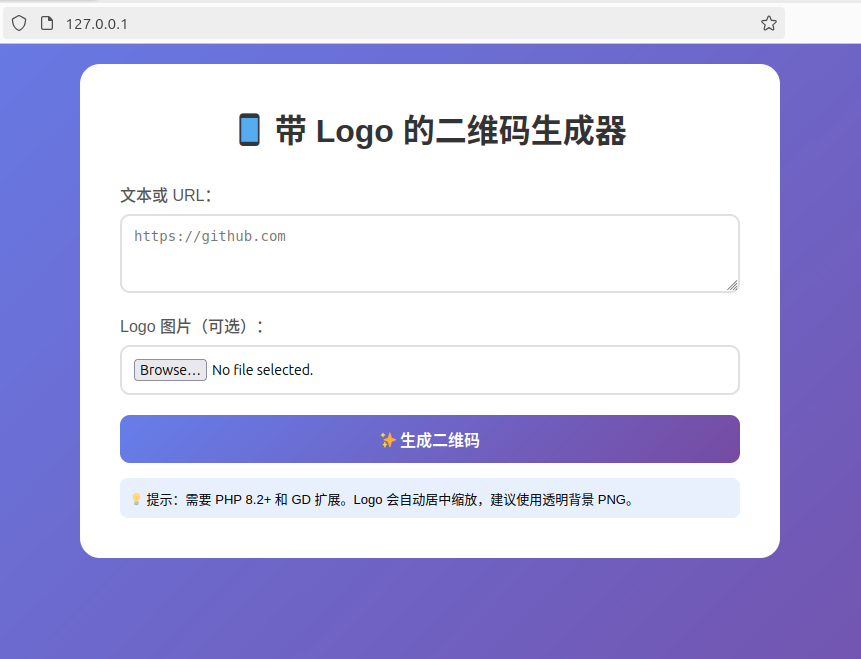
這是最基本應用 , 你還可以叫 deepseek 加上不同的內容 , 例如 : QR CODE 底色等等 …….
login name & password = demo